

Notion Isn't a Productivity App Anymore
What Notion 3.0 actually shipped, why context beats features, and a free template to get your AI working for you.

You built the workspace.
Databases for clients. A project tracker. Maybe even a CRM. You spent a weekend on it, felt productive, told yourself this is the system that sticks.
Three weeks later, you stopped opening it.
And when Notion started talking about AI, you gave it a shot. Asked it to summarize a page, got back something a college intern could’ve written with their eyes closed. Closed the tab. Moved on.
Fair.
You weren’t wrong. It just wasn’t ready yet.
But something happened while you were gone, and if you’re still judging Notion by that experience, you’re making decisions based on a version of the tool that doesn’t exist anymore.
In this issue: What Notion 3.0 actually changed, why context beats every other AI advantage, and a free Starter Agent OS template that gives your Notion AI a structured brain with specialist modes, database connections, and built-in memory. Want to watch an explainer video instead? Watch the video here.
What Changed While You Were Gone
Notion shipped a different product. Not a better note-taking app or a shinier database. Something else entirely.
Notion 3.0 brought custom agents, connections to your external tools, and AI that actually reads your workspace. Not a summary button added onto a sidebar, but AI that lives inside your projects, your databases, your actual work. It can pull context from what you’ve already built, connect to tools like Slack and Google Drive, and run workflows on your behalf.
One thing worth being upfront about: right now, you need the Business plan to access Notion AI. If you’re considering moving your team over, that’s a real cost to factor in, and nobody knows what pricing will look like in six months. Maybe usage-based, maybe per-agent, maybe something nobody’s announced yet. I think it’s worth it for what you get, but I’d rather you go in with eyes open than find out later.
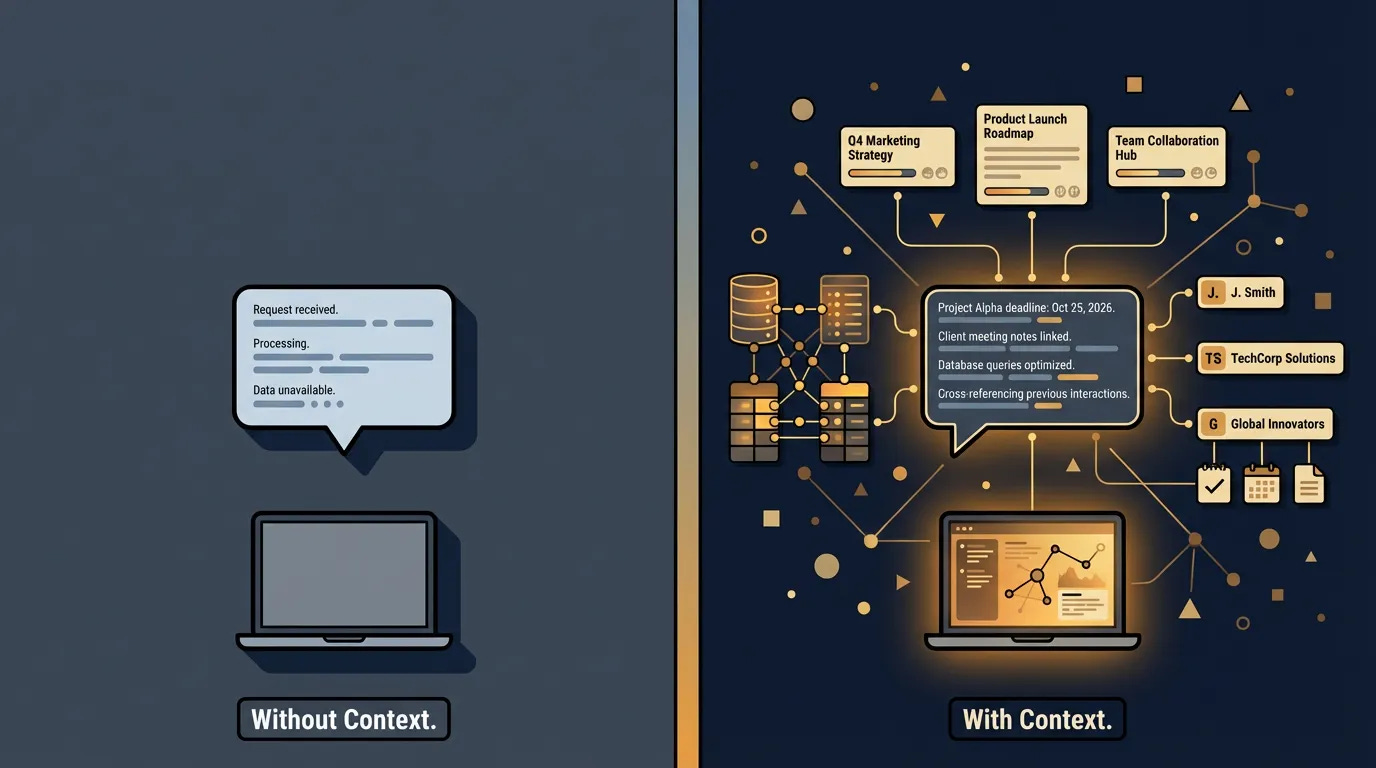
Why do I think it’s worth it despite not knowing future pricing? It’s because every other AI tool you use starts from zero. You open ChatGPT, and it knows nothing about you. Nothing about your clients, your projects, your last three meetings. You type a prompt, hope for something useful, and get back something that sounds like it was written for everyone and no one.
Notion flipped that. Your context already lives in your workspace: your notes, your databases, your meeting records, your project history. All of it. And now AI can actually use it.
Your tools connect, your data talks to each other, and your agents run on the context you’ve already built. That’s not a productivity app with a chatbot carelessy thrown in. It’s an AI hub, and you’re already sitting inside of it.
The tool you abandoned became the tool that finally makes AI useful.
The Context Advantage
Most AI tool reviews compare features, speed, interface, price. But none of that matters if the AI doesn’t know anything about your business.
Context is the difference between an AI that gives you generic answers and an AI that sounds like it’s been inside your business for years.
You’re probably already giving AI some context. You paste a paragraph of background text before your prompt. You explain your business in the first message. Maybe you keep a running note of “things to tell ChatGPT” and copy it in every time. That’s shallow context. One-time, manual, incomplete. It disappears the moment the conversation ends.
Notion’s advantage is deep context. Persistent, structured, and growing every time you work. Your databases aren’t just storage. They’re live context that AI reads across your entire workspace: project timelines, client histories, meeting notes, decision logs, internal playbooks. And it compounds. Every page you add, every property you fill in, every database row you create makes the AI’s understanding richer without you doing any extra prompting.
Shallow context means you’re re-explaining your business every session. Deep context means the AI already knows, and it gets smarter the longer you use it. If your work already lives in Notion, that deep context is already there. No exporting, no copy-pasting, no rebuilding from scratch.
The Part Nobody Wants to Hear
Having context isn’t enough.
It matters how your data is organized, and this is where most people hit a wall they don’t even see.
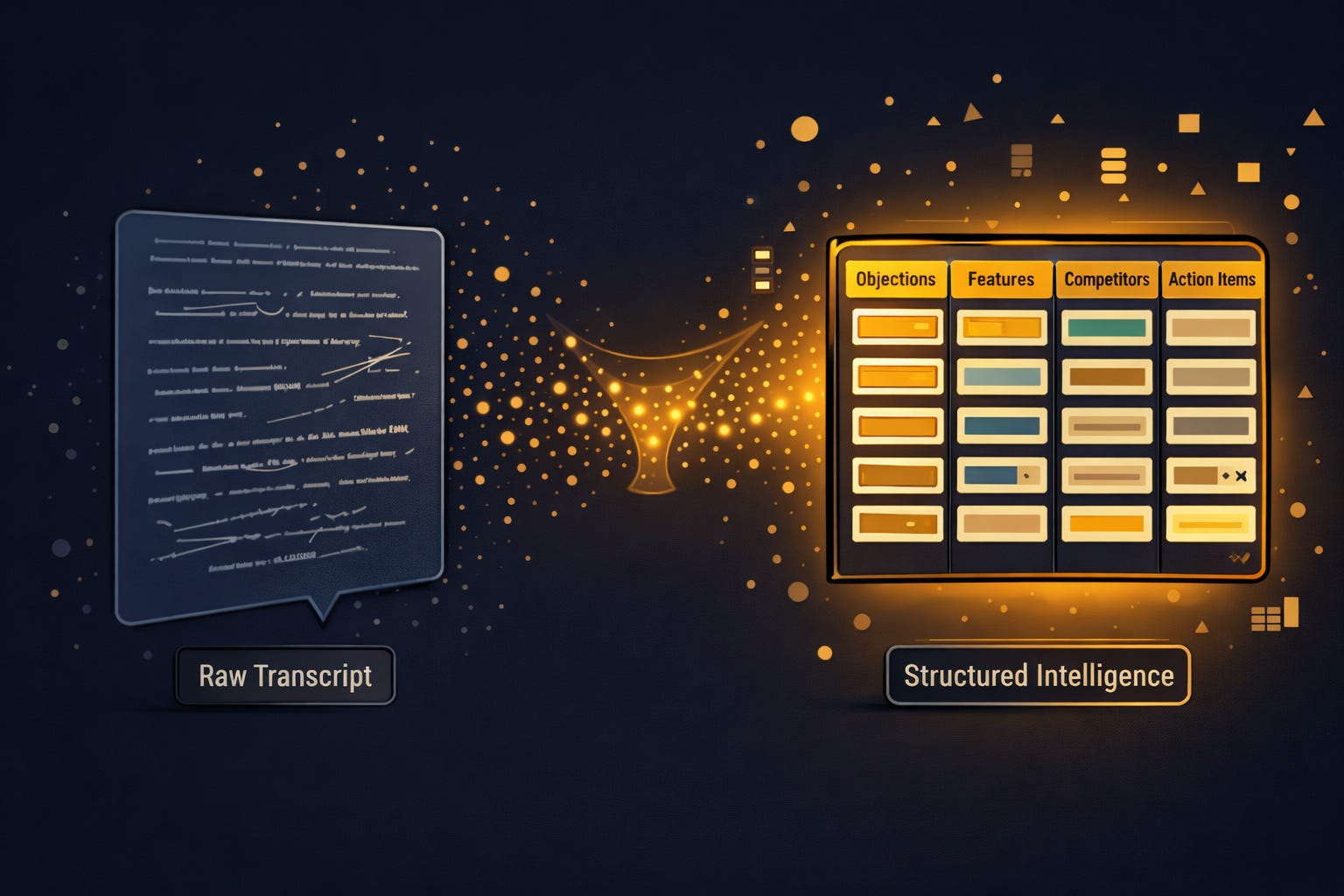
Say you record every sales call. Great habit. The transcripts live in a Notion database, dozens of them, maybe hundreds. Your AI can read every single one. But a raw transcript is noise: two people talking for forty-five minutes, small talk, tangents, the five minutes where your prospect talked about their dog. The actual insights are buried somewhere in there, and AI has to wade through everything to find them.
Now imagine a different version. Same calls, but after each one you extract the specific things that matter: the objections the client raised, the features they asked about, the competitors they mentioned, the moment they got excited. Each piece goes into its own column in a structured database.
Ten clients later, you have something that didn’t exist before. An objection-handling database built from real conversations, not theory, not a framework someone sold you. Actual patterns from your actual prospects.
Fifty clients later? You have a training resource that any new sales rep can study on day one. You have data you can analyze for trends across industries, deal sizes, and seasons. The kind of intelligence that would’ve required an enterprise system and a data team to build five years ago.
AI doesn’t just find patterns. It needs you to organize the raw material so the patterns are findable.
You’re not just taking notes. You’re building a knowledge asset.
You’re not just recording calls. You’re training your business.
You’re not just filling in database properties. You’re giving AI something real to work with.
This is knowledge management: the core skill that separates people who get inconsistent AI results from people whose AI gets smarter every week. And it's the kind of skill that almost nobody teaches, because it's harder to sell than a prompt template.
The Fundamentals That Don’t Expire
Most AI education teaches you which button to click, which tool to use, which prompt to copy. Six months later the tool updated, the button moved, and the prompt doesn’t work anymore. Back to square one, looking for the next tutorial that promises to finally make it click.
The skills underneath don’t have that problem.
Take prompt engineering. The person who learns why a specific prompt structure works (clear role, defined constraints, concrete examples, iterative refinement) can write effective prompts in any tool. The person who memorizes “type this exact phrase into ChatGPT” is stuck the moment the interface changes. One learned the architecture. The other learned the button.
Same with context management. Once you understand that AI performs better with structured, relevant context than with a wall of unfiltered information, you apply that everywhere. You write better agent instructions. You build cleaner databases. You structure your meeting notes differently because you know the AI is going to read them later. The skill compounds across every tool you touch.
Or take iteration. Most people try an AI workflow once, get mediocre results, and give up. The fundamental skill is knowing that the first version is always rough, and that the difference between “this doesn’t work” and “this is exactly what I needed” is usually two or three rounds of adjusting the instructions, tightening the context, and testing edge cases. That’s not a Notion skill. That’s a system-building skill.
The fundamentals don’t change even when the tools do.
Berkeley’s AI research lab calls this the shift from models to compound systems. The smartest researchers aren’t chasing bigger models. They’re building better architectures around them, combining retrieval, context, and tools into systems that are greater than the sum of their parts. Same principle applies to your Notion workspace.
Where You Start
So how do you actually give AI the context it needs?
Agent instructions. They’re the foundation layer: you tell AI who you are, how you work, what matters, what doesn’t. Think of it as onboarding a new hire, except the onboarding document is the hire. Every interaction starts from understanding instead of guessing.
But most people write agent instructions the way they write a bio. A few sentences about their job title, maybe a line about their industry, and a vague request like “be helpful and professional.” That’s not instructions. That’s a LinkedIn summary. The AI reads it, learns almost nothing, and defaults to the same bland output it gives everyone.
Good agent instructions are specific. They tell the AI what kind of work you do, who you do it for, what tools you use, how you like information presented, and what you don’t want. They include the context that changes how the AI thinks, not just what it knows. Telling it you’re a consultant is vague. Telling it you run strategy engagements for mid-market SaaS companies, prefer frameworks over checklists, and need outputs formatted for client-facing decks gives it something real to work with.
The other mistake is treating instructions as a one-time setup. You write them once, never touch them again, and wonder why the output plateaus. Good instructions evolve. You notice the AI keeps missing something, so you add a line. You realize it’s formatting things wrong, so you tighten the constraints. Over a few weeks, the instructions go from rough draft to operating manual, and the difference in output quality is night and day.
The gap between “AI doesn’t work for me” and “AI feels like it understands my business” is almost always an instructions problem.
I built a Starter Agent OS template that gives you the structure for this. It’s free inside my community Notion Agents Mastery. Let me walk you through what’s actually inside it.
What’s Inside the Starter Agent OS
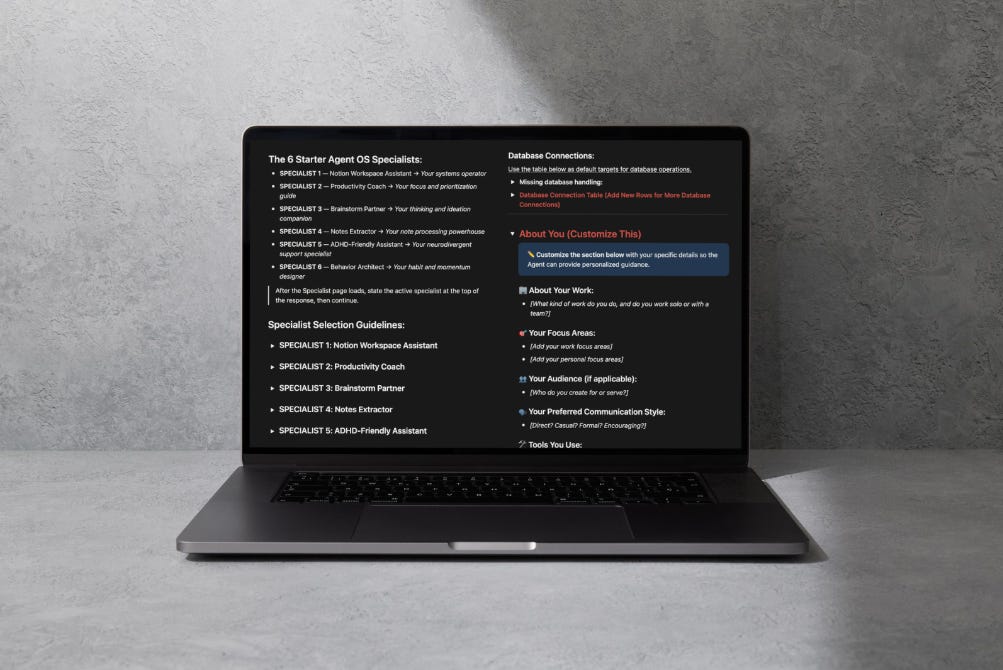
The template gives your Notion AI a structured “brain” with three layers that work together.
Layer 1: Your Identity
There’s an “About You” section where you fill in the basics: what kind of work you do, whether you’re solo or on a team, your focus areas, who you serve, your preferred communication style, and the tools you use daily. This is what the agent reads before every interaction. Simple to fill in, but it’s the piece most people skip entirely, and it’s the reason the output feels impersonal.
Layer 2: Specialist Modes
Instead of one generic AI that tries to do everything, the template routes your requests to six specialized modes:
Notion Workspace Assistant for database operations, page creation, and workspace organization
Productivity Coach for prioritization, routines, planning, and overwhelm reduction
Brainstorm Partner for exploring ideas, challenging assumptions, and developing concepts
Notes Extractor for processing meeting notes, transcripts, and pulling out action items
ADHD-Friendly Assistant for executive function support, attention-friendly workflows, and overwhelm prevention
Behavior Architect for building habits, breaking procrastination patterns, and creating momentum
Each specialist has its own detailed instructions. When you ask your AI something, it reads the request, picks the right specialist, loads those instructions, and responds accordingly. If a task needs workspace edits, it hands off to the Notion Assistant. If brainstorming surfaces a planning need, it suggests switching to the Productivity Coach.
The point isn’t that you need all six. The point is that specialized instructions produce dramatically better output than one generic prompt trying to cover everything.
Layer 3: Database Connections and Memory
The template includes a connection table where you link your actual Notion databases: tasks, projects, notes, content pipeline, goals. This is how your AI knows where to put things and where to look when you ask questions. Instead of creating orphaned pages that float in your sidebar, it writes directly into the systems you’re already using.
There’s also a “Your Notes” section that acts as running memory. Preferences, context, patterns that come up in conversation. You capture them as bullet points, and the agent references them going forward. It’s a simple version of what most people wish AI could do automatically: remember what you’ve told it and apply it next time.
And if you have a conversation worth keeping, you tell the agent to “log this chat” and it saves the full transcript to a Chat History database, tagged and searchable.
Why This Architecture Matters
Each layer solves a different problem. Your identity gives AI context about who you are. Specialist modes give it clarity on how to respond. Database connections tell it where your work lives. And memory means it gets better over time instead of starting from zero every session.
That’s the whole template. No code. No complex setup. Just structured context that turns a generic chatbot into something that actually understands how you work.
Your AI is only as good as the instructions you give it.
I’ll be honest: my first version was rough (and this starter template still is too). I thought I could write a few bullet points about my business and call it done. It took me three rewrites before the agent stopped producing output that sounded like it could’ve come from anyone. The difference between version one and version three wasn’t the model. It was the quality of what I gave it to work with.
Will you need to iterate? 1000% Yes. Will your first version be perfect? No. But this is where the compounding starts.
This is what After Hours is about.
Not tool reviews that expire in a month. Not prompt libraries you’ll never open again. Not “top 10 AI apps” that all blur together.
Systems thinking. Architecture. How to organize your space so AI has something real to work with, and how to build once and let it compound.
The tools will change. The architecture won’t.
See you in the next one.
-Tam
Appreciate how you framed this so well, Tam - especially the move from “what should this do?” to “what should this make someone feel?” Something I’ve been noticing alongside that: once the structure is good enough, the next risk isn’t chaos... it’s rigidity.
AI starts reinforcing whatever structure exists. If the structure is thoughtful, that compounds well. If it’s slightly off, it quietly hardens those assumptions.
I guess it's not a criticism of the tool but more a reminder that the structure itself needs review cycles.
I'm just curious how you think about that part, like when to redesign the scaffolding instead of optimizing inside it. 🤔💭
This is exactly why most people bounce after 3 weeks. They built a pretty workspace, not a working system. The deep-context point is the real unlock. AI gets useful when it’s fed structured reality, not vibes 😅