

The AI Blueprint Hiding in Plain Sight: The Anatomy of a Claude Skill (And Why It Changes Everything)
Learn one pattern, unlock every AI tool

If I told you there was one thing you could study for 30 minutes that would make you better at ChatGPT, help you build Notion agents, and prepare you for Claude Code... would you do it?
Cool. Let me show you the anatomy of a Claude Skill.
The Problem Nobody Talks About
Most people treat AI tools like a magic box. You type something in, something comes out, and if it’s good... great. If it’s not, you tweak the prompt and try again. Rinse and repeat.
And honestly? That works. For a while.
It works when you’re asking ChatGPT to summarize an article. It works when you’re using Claude to brainstorm ideas. It works when the stakes are low and your expectations are “good enough.”
Have you ever noticed that your results are inconsistent? Like, sometimes you get this brilliant, perfectly structured response. And other times the exact same prompt gives you something completely off? You probably blamed the AI. Or yourself. Or the moon phase.
What’s actually happening: you’re interacting with a system you don’t understand. And that’s not your fault — nobody teaches this part. Every AI tutorial out there teaches you what to type. Almost none of them teach you how the thing you’re typing into actually works.
And that gap (the gap between using AI and understanding AI) is the single biggest thing holding most people back from going from casual user to actual builder.
Let’s close it.
What Is a Claude Skill, Really?
A Claude Skill is a pre-built capability inside Claude that’s designed to do a specific job well. Think of it like a specialist you can call on — it has its own instructions, its own reference material, and its own way of deciding how to handle your request.
But look closer. A Claude Skill is just architecture. And when you pull it apart, you find four components that show up in virtually every AI tool you’ll ever use.
I’ll walk you through them.
1. The System Instruction
This is the foundation. The system instruction is essentially the job description you hand someone on their first day. It tells the AI: here’s who you are, here’s what you do, here’s how you do it, and here’s what you absolutely should not do.
In a Claude Skill, this is the core prompt that defines the Skill’s behavior. It sets the tone, the scope, the rules, and the guardrails.
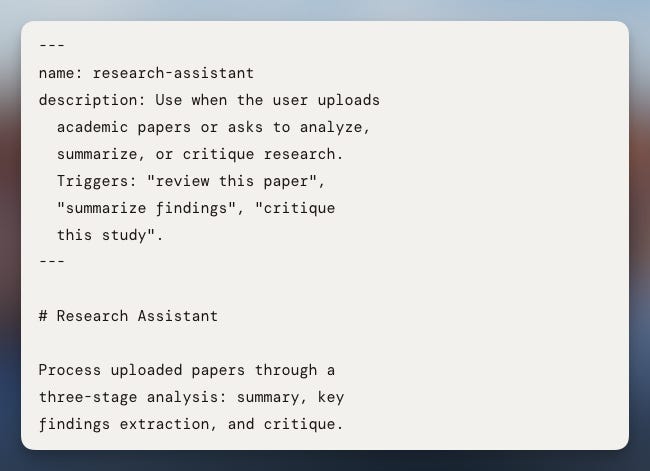
Why does this matter for you? Because every single AI tool has some version of this. When you create a Custom GPT, you write a system instruction. When you build a Notion agent, you write one. When you set up a Claude Code project, you write one. The concept is identical across all of them. The only thing that changes is where you put it and what the platform calls it.
2. The Router
This is the part most beginners don’t even know exists, and it’s the part that makes everything click.
A router is the decision-making logic that figures out what to do with your request. Think of it as the manager who reads your message and says, “Okay, this needs to go to the research department” or “This is a writing task, send it over there.”
In a Claude Skill, the router looks at your input and decides which path to take — which instructions to prioritize, which context to pull in, and how to structure the response
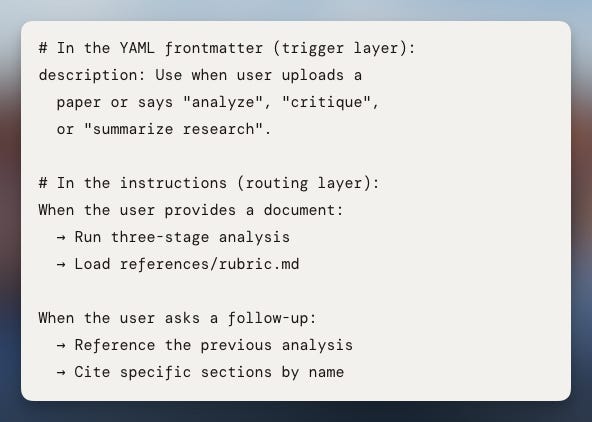
Why this matters: once you realize that AI tools route your requests through logic paths, you stop treating prompts like lottery tickets. You start thinking about what path you want the AI to take and how to guide it there. That’s the difference between hoping for a good output and designing one.
3. Context Files (Reference Material)
Imagine hiring someone brilliant but giving them zero background information. No documentation, no examples, no data. Just vibes. That’s what most people do when they prompt AI tools.
Context files in a Claude Skill are the reference binder sitting on the desk. They’re the documents, examples, data, and background information that the Skill can pull from to give you an informed, grounded response.
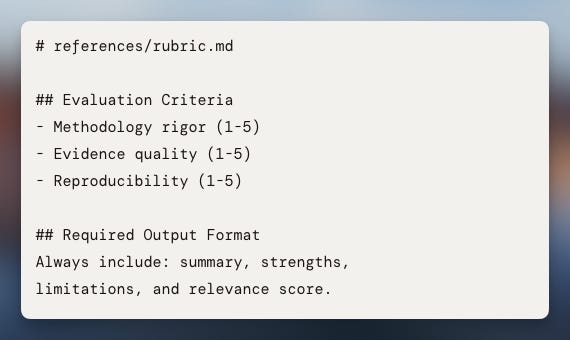
This is where things start to get practical. In a Custom GPT, these are your uploaded knowledge files. In a Notion agent, these are the databases and pages the agent can access. In Claude Code, these are your project files and documentation.
Same concept. Different packaging.
4. Naming and Organization (Progressive Loading)
And the quiet one that makes everything run smoother.
How you name and organize your files, your instructions, your context — it all matters. Not just for your own sanity, but for how the AI processes information.
In a Claude Skill, components are named clearly and loaded progressively. That means the system doesn’t dump everything into memory at once. It loads what it needs, when it needs it. This is called progressive loading, and it’s a token optimization strategy.
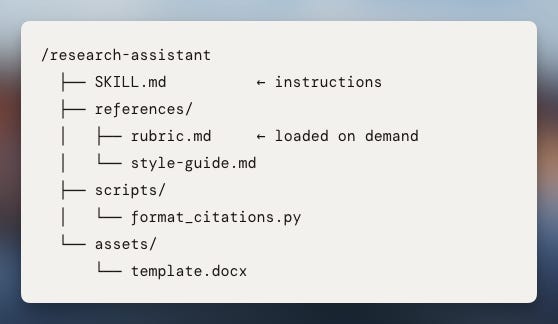
Now, and this is the honest part, if you’re paying for a ChatGPT or Claude subscription, you don’t really feel the impact of token optimization. You’re paying a flat rate. The AI can be a little wasteful and it doesn’t hit your wallet.
But the moment you start building agents or writing in Claude Code, you’re connected to your own API key. And suddenly every token costs money. Clean naming, smart organization, and progressive loading go from “nice to have” to “this is saving me actual dollars.”
Even if you never touch an API key, though, good naming and organization leads to better outputs. Period. A well-organized system instruction gets better results than a messy one. Every time.
Why This Architecture Is Everywhere
This is where it all comes together, and the real reason I wanted to write this.
These four components (system instruction, router, context files, and naming/organization) are not unique to Claude Skills. They are the underlying architecture of virtually every AI tool you’ll use.
Look at this:
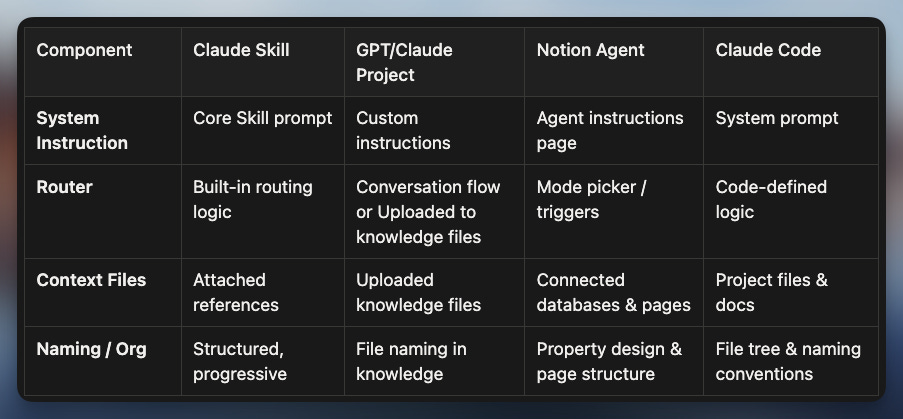
Do you see what I mean? The vocabulary changes. The interface changes. But the bones are the same.
This is why learning the anatomy of a Claude Skill is so powerful. You’re not learning one tool. You’re learning the pattern that runs underneath all of them.
It’s like learning to read sheet music. Once you can read it, you can play piano, guitar, violin — whatever. The instrument changes, but the language doesn’t.
What Changes When You See It
Okay so let’s be practical. Once you understand this architecture, what actually changes in your day-to-day?
Your prompts get better immediately
When you know that a system instruction exists, you start thinking about what instructions the AI is already working with before you even type. You stop fighting the system and start working with it. Your prompts become more precise because you understand what the AI needs from you.
You stop guessing and start designing
Building an agent or a Custom GPT goes from “I’ll try random things until something works” to “I need a clear system instruction, a routing logic for different request types, the right context files, and clean naming.” That’s a blueprint. You can follow a blueprint.
(And if you’re still finding yourself fighting AI suggestions or editing them into submission, this might help.
Token optimization clicks into place
Progressive loading, clean naming, structured context — these aren’t abstract concepts anymore. They’re practical decisions you make when you’re building something. And when you eventually connect to an API key (whether through Notion agents, Claude Code, or something else), you’ll already be thinking about efficiency.
The graduation path opens up
The big one. This architecture creates a natural learning path:
Claude Skill: you see the anatomy in its clearest, most visible form.
Notion Agents: you apply the same architecture inside a workspace you already use, with databases as your context layer.
Claude Code: you take full control, writing the system prompts, routing logic, and file organization yourself.
Each step builds on the one before. And because the architecture is the same, you’re never starting from scratch. You’re just graduating to a more powerful instrument while reading the same sheet music.
Your Next Move
You’ve got a choice.
If you’re the kind of person who learns by reading, you just did. You now understand the four components that make AI tools tick. Go open a Claude Skill (any of them) and see if you can identify each piece. I promise you’ll start seeing the architecture everywhere.
If you’re more hands-on, I’ve built a Claude artifact that lets you explore a Skill interactively. You can click into each component, see what it does, and understand why it’s structured that way. Think of it as the lab to this article’s lecture.
If you’re a visual learner, I’ve put together a NotebookLM video that walks through the differences between a GPT project, a Claude Skill, and a Notion agent side by side. Same architecture, different clothes. Seeing them next to each other makes the pattern impossible to miss.
And if you want to go deeper (if you want to actually build agents, learn the systems behind them, and join a community of people who are doing the same thing), that’s exactly what we’re doing inside Notion Agents Mastery. No fluff. Just the practical stuff that actually moves the needle.
Bottom line? You don’t need to learn every AI tool. You need to learn the architecture once. The rest is just application.
And now you have the blueprint. 🫡
This is SO useful for anyone building with AI, thank you Tam :)